Short version. Keepsafe is polished, actively maintained, and rated 4.7 across roughly 382,000 ratings. It is also built around an account and a company cloud, and the recurring theme in its critical reviews is people unable to get their own photos back. If you are already using it, the most useful thing on this page is the export section — whether or not you ever switch.
We make a competing app, so read this with that in mind. Everything about Keepsafe here is either on its App Store listing or in its public reviews and r/keepsafe, and dated. The section on what it does better is not a courtesy — it is the reason some people should stay.
Side by side
| Hushfold | Keepsafe | |
|---|---|---|
| Track record | New, launching 2026 | 4.7 across ~382,000 ratings |
| Account required | Never | Yes |
| Backup goes to | Your own iCloud, as ciphertext, free | Keepsafe's servers, paid tier |
| Works across your devices | Same Apple Account only | Any device with your login |
| Video compression | HEVC with a measured quality gate, side-by-side compare, 30-day undo | Not a headline feature |
| Second PIN opening a different vault | Yes | Has a fake-PIN concept |
| Update cadence | New app | Every one to two weeks |
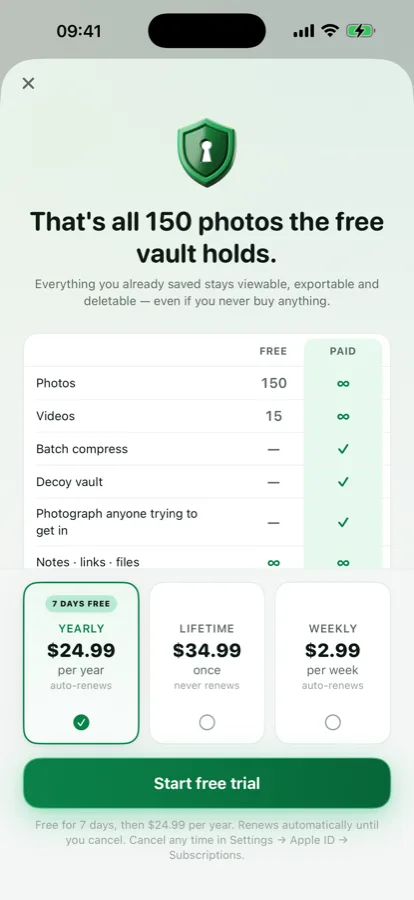
| Price | Free to 150 photos / 15 videos; $24.99 a year with 7 days free, $34.99 once, or $2.99 a week | ~$9.99/month, ~$23.99/year, ~$35.99 lifetime |
| Viewing your own photos without paying | Always, including above the free cap | Depends on tier |
Keepsafe figures from its App Store listing as read on 5 September 2026. Both sides change; correct us if this is stale.
What Keepsafe does better
It ships constantly. A new build every week or two is a real signal about whether an app will still work after the next iOS. Most indie vaults cannot match that and we should not pretend we can.
An account is not only a cost. Because your photos live with them, you can sign in on a new phone, or an Android, or a borrowed device, and they are there. Our design cannot do that: no account means no way to identify you, which means your backup is tied to your Apple Account and nothing else. For some people that is the wrong trade.
It is a known quantity. Hundreds of thousands of people have already found the bugs.
What its reviews and r/keepsafe actually say
A 4.7 average is earned. The critical reviews are still where the decision-relevant information is, and the themes recur across App Store reviews and r/keepsafe threads from 2025:
- Data loss around sync. The most serious and most repeated complaint in the whole category, not only theirs.
- Bulk export failing on large libraries — the specific failure that turns "I'll switch later" into "I can't".
- Large video imports failing.
- Sync hanging without finishing or reporting an error.
- No zoom in the viewer, which sounds minor until you use it daily.
- Account lock-out, where the credential you need is the one you set up years ago.
Check this for yourself rather than trusting our summary: App Store → Ratings & Reviews → See All → Most Critical, and search r/keepsafe. Do exactly the same to us once we have reviews.
How to export from Keepsafe safely
This section is useful whether you switch to us, switch to someone else, or stay. A vault you cannot get out of is a risk regardless of which one it is.
- Export in batches, not all at once. Large exports failing is the specific complaint; small batches fail smaller.
- Move each batch to a computer and open several files there. Check dimensions and file size — you are looking for full resolution, not thumbnails.
- Check the videos play the whole way through, not just the first frame.
- Keep the copy on the computer until the new destination is set up and its own backup has run at least once.
- Only then delete from Keepsafe, and cancel the subscription after the export, not before.
If an export stalls repeatedly, their support is the correct next step before anything drastic. Do not delete the app to "reset" it.
Why "no account" changes more than it sounds
It reads like a small convenience — one less form. In practice it changes three separate things, and it is the clearest difference between these two apps.
It removes a category of failure. An account can be locked out, a password-reset email can go to an address you no longer control, a provider can require a verification you cannot complete. None of those can happen to something that never had an account.
It removes a database. There is no list of our users because there is no list. Nothing to breach, nothing to hand over, nothing to sell if the company is bought.
And it removes a safety net. This is the honest half. If you forget your master password and lose your recovery phrase, your photos are gone and we cannot help, because we hold nothing that could help. An account-based service can usually get you back in — and the reason it can is the same reason it could read your photos if it chose to. You cannot have both properties at once, and choosing which one you want is the actual decision here.
The four questions worth asking any vault
Not just these two. If you are shopping, these predict how it will feel in two years better than any feature list:
- Does it need an account? If yes, you have identified yourself to a company before hiding anything, and their sign-in becomes a thing that can fail.
- Where does the backup live? Their servers means their uptime and their continued existence. Your iCloud means your quota and your Apple Account.
- What does the App Store privacy label say? One tap on the listing. "Data Not Collected" is the only answer that matches the promise.
- Is a complete export free, and have you tested it? Test on day one, not on the day you need it.
Our answers, so you can hold us to them: no account; your iCloud; Data Not Collected; and a free export of the entire vault to a single file, which we will never put behind a purchase.
What each costs over three years
Monthly pricing is the number that surprises people later, so here it is laid out. Listed prices as of September 2026, before any regional difference or promotion:
| Year 1 | Year 3 | |
|---|---|---|
| Keepsafe monthly (~$9.99) | ~$120 | ~$360 |
| Keepsafe yearly (~$23.99) | ~$24 | ~$72 |
| Keepsafe lifetime (~$35.99) | ~$36 | ~$36 |
| Hushfold yearly ($24.99, 7 days free) | ~$25 | ~$75 |
| Hushfold once ($34.99) | ~$35 | ~$35 |
The two yearly tiers are within a dollar of each other, and both one-time tiers are close. Price is not the deciding factor between these apps; the account question is. Pick on that, then pick the billing period you prefer.
Who should pick which
| If you… | Pick |
|---|---|
| Need the same vault on an Android or a borrowed device | Keepsafe |
| Want a company responsible for your backup | Keepsafe |
| Value a weekly update cadence and a long history | Keepsafe |
| Do not want to create an account anywhere | Hushfold |
| Are out of iPhone storage because of video | Hushfold |
| Want “Data Not Collected” on the listing | Hushfold |
| Have been burned by a sync losing photos | Whichever you choose, export today and keep a copy off the phone |
Also: Hushfold vs Private Photo Vault · how to hide photos on iPhone · our encryption in detail
Frequently asked questions
Is Keepsafe safe?
Its encryption has not been the problem. The pattern in its critical reviews and in r/keepsafe is loss and lock-out: syncs that do not finish, bulk exports that fail, large video imports that fail, and accounts people cannot get back into. If you use it, the single most protective thing you can do is run a full export today and check the files open.
Does Keepsafe require an account?
Yes. It is built around a Keepsafe account, which is how its sync and its cross-device features work. That is a design choice rather than an oversight — but it does mean giving an email address to a company before hiding anything. Checked September 2026.
How much does Keepsafe cost?
As listed in September 2026: around $9.99 a month, $23.99 a year, or roughly $35.99 for a lifetime tier. Prices change and vary by region; check the listing.
What happens to my photos if I stop paying for Keepsafe?
Features tied to the paid tier stop. This is the question to answer for any vault before you commit, and the answer you want is that viewing, exporting and deleting what you already own keep working regardless. Test it by finding the export before you subscribe, not after.
How do I get my photos out of Keepsafe?
Its export exists but its reliability for large libraries is a recurring complaint. Export in batches rather than all at once, verify each batch opens on a computer at full resolution, and only then delete anything. Do not trust a progress bar as proof.
What is a good Keepsafe alternative that does not need an account?
Several exist, including ours. The things worth comparing are not feature lists: whether an account is required, whether the backup goes to the company or to your own iCloud, what the App Store privacy label says, and whether a full export is free. Those four answers predict how it will feel in two years.