Short version. Private Photo Vault has around a million ratings at 4.8, a photo editor, and years of iteration behind it. If you want the safe, established choice, that is the safe, established choice and this page will not argue otherwise. The three places the apps genuinely disagree are how compression should work, whose servers hold your backup, and whether an app should collect usage data at all.
We are not a neutral party. We make one of the two apps on this page. So everything below is either checkable on their App Store listing or quoted from their public reviews, and the section on where they beat us is real rather than decorative. If something here is out of date, tell us and we will correct it.
Side by side
| Hushfold | Private Photo Vault | |
|---|---|---|
| Track record | New, launching 2026 | ~1M ratings, 4.8 average |
| Compression | Hardware HEVC, kept only if ≥15% smaller and above a measured quality bar; side-by-side compare; 30-day undo | “Space Saver”; reviews report it is unclear what was given up |
| Account required | Never | For cloud backup |
| Backup goes to | Your own iCloud, free | Their servers, paid tier |
| App Store privacy label | Data Not Collected | Usage Data |
| Age rating | 4+ | 16+ (it contains a web browser) |
| Photo editor | No | Yes |
| Built-in browser | No, deliberately | Yes |
| Viewing your own photos without paying | Always, including above the free cap | Depends on tier |
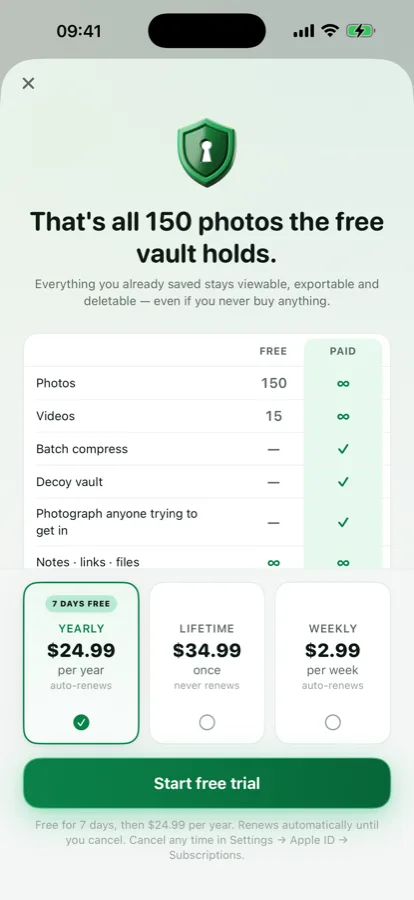
| Price | Free to 150 photos / 15 videos, then $24.99 a year with 7 days free, $34.99 once, or $2.99 a week | Subscription, or a one-time tier around $39.99 |
Their column reflects their App Store listing as read on 5 September 2026. Prices and features on both sides change.
Where Private Photo Vault is genuinely ahead
It has a million people's worth of bugs already found. That is not a small thing for an app you are about to trust with photos you cannot replace. Every new app, ours included, has failure modes nobody has hit yet.
It has a photo editor. Crop, rotate, adjust, inside the vault, without exporting to Photos and back. We do not have one and are not building one for launch.
Someone else runs the backup. Their cloud is their responsibility, including the part where it has to still be there in three years. Ours is your iCloud, which means your storage quota and your Apple account — better for privacy, more work for you if you have never thought about iCloud storage.
It exists. You can install it this afternoon.
What the one-star reviews actually say
A 4.8 average across a million ratings is a good app. The useful information is in the critical reviews, because that is where you learn what goes wrong when it goes wrong. Sorted by Most Critical, the repeating themes as of September 2026:
- Cloud sync removing part of a library. The most serious category and the one that appears in this niche's worst reviews generally, not just theirs.
- Space Saver being unclear about what quality was lost and what happened to the originals.
- Import friction — several taps per batch.
- Crashes after an update, which is a recurring pattern across the category when a new iOS ships.
- The Usage Data declaration, which some reviewers find at odds with the app's purpose.
Read these yourself rather than taking our summary: App Store listing → Ratings & Reviews → See All → Most Critical. Do the same for us when we launch.
Disagreement 1 — what a compressor owes you
Any app can make a file smaller. The only question that matters is what you gave up, and most apps do not tell you.
Our position is that a compressor should be able to refuse. Hushfold measures the difference between the original and the new file on sampled frames, shows you the number, and will not keep the result unless it is at least 15% smaller and stays above the quality bar. Then it shows both versions in one player, at the same timestamp, and you decide. The original waits in the bin for 30 days.
None of that requires trusting us, which is the point. A feature that says "trust me, it looks fine" and a feature that shows you the number are different products even when the output is identical.
Disagreement 2 — whose server
Their backup goes to their infrastructure, which means an account, which means an email address on file before you have hidden anything.
Ours goes to your iCloud as ciphertext. We have no server at all — not a cheaper one, none. That has a real cost: it uses your iCloud quota, the free 5 GB fills fast with video, and if you lose access to your Apple Account we cannot help you, because we have nothing of yours to help you with.
It also has a real benefit, which is that there is no database of ours to breach, subpoena or sell, and no company that has to still exist in 2031 for your backup to work.
Disagreement 3 — collecting anything at all
Their listing declares Usage Data. Ours declares Data Not Collected, and that is a claim you can verify from outside: open the App Privacy section of either listing on the App Store.
We think a privacy app collecting analytics is a contradiction, and we accept the cost — we genuinely do not know how people use the app and have to find out by asking them.
If you are switching, do it in this order
- Export from the old app first. Find the export before you do anything else. If there isn't one, that is the whole answer.
- Open a few exported files on a computer. Confirm full resolution, not thumbnails. This catches the worst outcome before it is irreversible.
- Import into the new app and open several at full size.
- Only then delete from the old app, and remember it may have its own 30-day bin.
- Set up the new app's backup on day one. Do not leave it for later; later is after the phone is lost.
What neither app can do
Worth knowing before you choose either, because no listing says it:
- Neither can block a still screenshot. iOS does not give apps that power. If someone is holding your unlocked phone with the vault open, no vault helps.
- Neither can hide itself from Settings. Every installed app appears in Settings → General → iPhone Storage and in Screen Time, under its real App Store name, whatever its icon shows.
- Neither survives you forgetting the password if the encryption is real. That is the trade: an app that can reset your password for you is an app that can read your photos.
- Neither is covered by your normal iPhone backup in the way Photos is, because the whole point is that the files are not in your photo library. Whichever you pick, set up its backup deliberately.
Who should pick which
| If you… | Pick |
|---|---|
| Want the established option with the longest track record | Private Photo Vault |
| Want to edit photos inside the vault | Private Photo Vault |
| Want someone else responsible for the backup | Private Photo Vault |
| Are out of storage because of video | Hushfold |
| Do not want to give anyone an email address | Hushfold |
| Want a second PIN that opens a different vault | Hushfold |
| Want “Data Not Collected” on the listing | Hushfold |
| Cannot decide | Both are free to start. Install both, import ten photos, see which you reopen. |
Also: Hushfold vs Keepsafe · how video compression actually works · our encryption in detail
Frequently asked questions
Is Private Photo Vault safe?
Its encryption is not the weak point — the app has a long track record and a 4.8 average across roughly a million ratings. The recurring one-star complaints are about data, not cracking: people report cloud sync removing part of their library, and confusion about what its Space Saver feature did to their originals. Judge it on backup reliability, not on whether someone can break the cipher.
Does Private Photo Vault need an account?
Not to use the vault on your phone. An account is required for its cloud backup, because the backup goes to the company’s servers rather than yours. Checked September 2026.
What is Space Saver in Private Photo Vault?
A feature that reduces the space your media takes on the device. The consistent complaint in its reviews is that it is not clear what quality was given up or where the originals went. Whatever app you use, the thing to insist on is seeing both versions before the original is discarded.
Is there a photo vault that does not collect usage data?
Check the App Privacy section of any listing before installing. Private Photo Vault’s listing declares Usage Data as of September 2026. Hushfold’s declares Data Not Collected, which is possible because it has no server and no analytics of any kind.
Can I move my photos out of Private Photo Vault?
Yes, it has an export. Before switching anything anywhere, export first and open a few files on a computer to confirm they are full resolution and not thumbnails. Do that before you delete anything from the old app.
Which is better for video?
It depends on what you want. Private Photo Vault has been doing this longer and has a photo editor. If your problem is specifically that videos are eating your storage and you do not trust a compressor you cannot check, the measurable quality gate is the difference — and you should try both, since both are free to start.